Choosing the Best AI Tools for Real Estate Marketing Videos
How to choose the best AI video tools for real estate listings: BetterSpace vs Runway vs OpusClip vs ElevenLabs compared specifically for listing video creation workflows.
· Sophie
AI Real Estate MarketingFor a broader comparison covering AI tools beyond video (staging, graphics, writing), see our complete AI tools for real estate agents guide.
Introduction
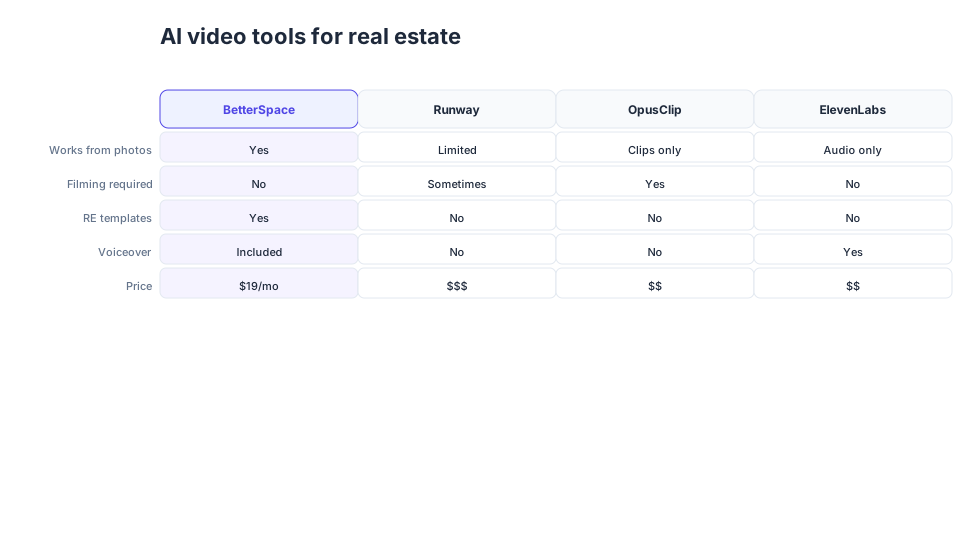
In the competitive landscape of real estate, captivating marketing materials are essential for attracting potential buyers and closing deals. High-quality videos stand out as one of the most effective ways to showcase properties. With the rise of artificial intelligence, real estate professionals can leverage AI tools to create compelling marketing videos quickly and efficiently. However, the abundance of options can make it challenging to select the right tool for your needs.
This guide will help you navigate the landscape of AI video tools, highlighting the best options available, their key features, and effective strategies for utilizing them to enhance your marketing efforts.
Quick Summary
To create impactful real estate marketing videos, agents should prioritize AI tools that offer user-friendly interfaces, advanced editing capabilities, and customizable templates. Top contenders include BetterSpace, Animoto, and Magisto.
Understanding Your Needs
Before diving into specific tools, it’s crucial to assess your needs as a real estate agent. Consider the following factors:
- Budget: Determine how much you’re willing to invest in video creation.
- Video Style: Identify the types of videos you want to produce—virtual tours, promotional clips, or educational content.
- User Experience: Reflect on your comfort level with technology and video editing tools.
- Integration: Seek solutions that seamlessly fit into your existing marketing platforms.
Key Features of Effective AI Video Tools
When evaluating AI tools for real estate videos, focus on these essential features:
- Templates and Customization: Tools with pre-designed templates can save time and ensure a polished appearance.
- AI Editing Capabilities: Advanced AI features can enhance video quality and automate editing processes, suggesting improvements based on best practices.
- Music and Voiceover Options: A diverse selection of royalty-free music and voiceover capabilities can significantly enhance your video’s appeal.
- Analytics: Some tools provide insights into viewer engagement, helping you refine future marketing strategies.
Top AI Tools for Real Estate Videos
Here are some of the best AI tools for crafting real estate marketing videos:
| Tool Name | Key Features | Pricing Model | Best For |
|---|---|---|---|
| BetterSpace | AI-driven photo-to-video conversion | Free plan with 1 video/month; Paid plans from $19/month | High-impact, social-ready videos |
| Animoto | Drag-and-drop interface, templates | Pay-per-video | Quick video creation for social media |
| Magisto | Automated editing, storytelling AI | Monthly subscription | Engaging narrative-driven videos |
| InVideo | Extensive editing tools, templates | Free with watermark | Customizable videos for all platforms |
| Wave.video | Live streaming, video hosting | Tiered pricing | Versatile video marketing solutions |
Why Choose BetterSpace?
Among these tools, BetterSpace distinguishes itself with its focus on transforming static real estate images into dynamic videos optimized for social media sharing. By harnessing AI technology, BetterSpace simplifies the video creation process, allowing real estate agents to showcase listings in a visually captivating manner without extensive video editing experience.
Creating Compelling Real Estate Marketing Videos
Once you’ve selected an AI tool, follow these steps to produce effective videos:
- Gather High-Quality Images: Use professional photos of the property to ensure your videos look polished.
- Choose a Template: Select a template that aligns with your brand’s style and the nature of the listing.
- Incorporate Text and Graphics: Add text overlays to emphasize key features, such as square footage, number of bedrooms, and unique selling points.
- Add Background Music: Choose a track that complements the video and enhances the mood without overwhelming the visuals.
- Review and Edit: Utilize the tool’s editing features to refine the video, ensuring smooth transitions and high-quality visuals.
- Publish and Share: Once satisfied, share the video on social media, your website, and other relevant platforms.
Key Takeaways
- Selecting the right AI tool can significantly enhance your real estate marketing efforts.
- Prioritize tools that offer user-friendly templates and advanced editing features like BetterSpace.
- Always focus on high-quality images and effective storytelling in your videos.
- Utilize analytics to refine your approach for future videos.
- Invest time in learning the tool to maximize its potential.
Frequently Asked Questions (FAQs)
Q1: What is the best AI tool for real estate videos?
A1: The best AI tool depends on your specific needs, but BetterSpace is highly recommended for its photo-to-video capabilities, making properties stand out.
Q2: How much does it cost to use AI video tools?
A2: Pricing varies widely; some tools like Animoto offer pay-per-video options, while others like BetterSpace have subscription models starting at $19/month.
Q3: Can I use these tools for social media marketing?
A3: Absolutely! Most AI video tools are designed for social media sharing and provide templates optimized for platforms like Instagram and Facebook.
Q4: Do I need video editing experience to use these tools?
A4: No, many AI video tools, including BetterSpace, are user-friendly and designed for users with little to no video editing experience.
Q5: How can I measure the success of my real estate videos?
A5: Use the analytics features provided by your chosen tool to track viewer engagement, shares, and conversions to evaluate video performance.
Related reading
Frequently asked questions
-
What is the best AI tool for real estate videos?
The best AI tool depends on your specific needs, but BetterSpace is highly recommended for its photo-to-video capabilities, making properties stand out. It requires no filming or editing and starts free. -
How much does it cost to use AI video tools?
Pricing varies widely; some tools like Animoto offer pay-per-video options, while others like BetterSpace have subscription models starting at $19/month. BetterSpace's free plan includes one AI listing video per month. -
Can I use AI video tools for social media marketing?
Absolutely. Most AI video tools are designed for social media sharing and provide templates optimized for platforms like Instagram, TikTok, and Facebook. BetterSpace exports both 16:9 and 9:16 formats from a single listing upload. -
Do I need video editing experience to use AI video tools?
No. Many AI video tools, including BetterSpace, are user-friendly and designed for users with little to no video editing experience. The AI handles scene pacing, transitions, voiceover, and captions automatically. -
How can I measure the success of my real estate videos?
Use analytics features provided by your chosen tool to track viewer engagement, shares, and conversions. For listing videos, track the correlation between video publication and showing requests per property.